When Latency Becomes Audible
The audio engineering behind low-latency voice systems. After working through LiveKit and Pipecat internals, I wanted to understand what really happens once TTS audio reaches the transport layer. This post is about how audio gets framed and paced, how VAD knows when you start and stop talking, how bursty TTS output becomes steady, click-free speech in real time, and how jitter buffers and backpressure keep the pipeline under control.
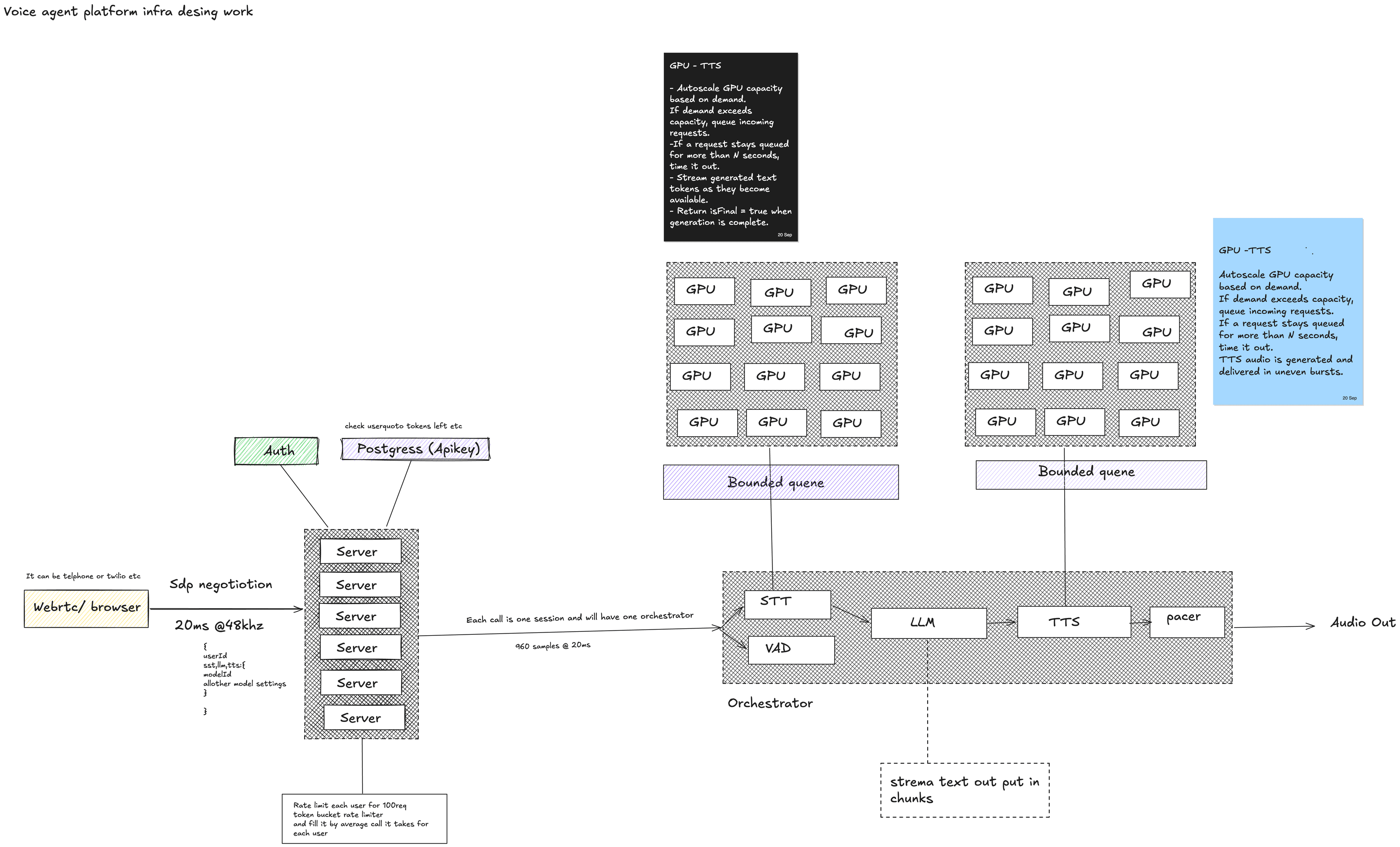
I've been working in voice AI for a while. I've built a lot of voice agents with LiveKit and Pipecat, and I've contributed a fair bit to both. But for a long time, there was still a lot I didn't understand about what was happening underneath.
These frameworks give you clean APIs. You wire up a pipeline, connect the pieces, and it works. But they also hide the machinery. When you speak into a microphone and an agent responds, what is actually happening between those two moments?
That gap is where the interesting systems problems live. Audio has to move continuously. Voice activity detection has to decide when you started and stopped speaking. STT, the LLM, and TTS all have to stay in sync. The system has to know when to send text to the model, when to start speaking, when to stop, and how to handle barge-in when the user interrupts.
And all of this has to happen concurrently, in a few hundred milliseconds. If it takes longer, the conversation starts to feel broken.
To understand it properly, I built my own voice infrastructure from scratch. This blog is the mental model I came away with. If you read it carefully, you will know enough to build your own streaming media pipeline from scratch, because the only way to really understand a system is to understand what every piece does and why it is there.
The first version is done. It works end to end. Browser audio goes in, an agent's voice comes back, and you can watch every stage of the pipeline while it runs. What follows is everything I learned building it.
Before getting into the pipeline, it helps to start with what audio actually is. Real-world sound is a continuous pressure wave. A microphone turns that wave into an analog electrical signal, and an audio interface turns the analog signal into numbers by measuring its amplitude at fixed intervals. That process is called sampling. Each measurement gets stored with finite precision, typically 16 bits. Each measurement is a sample.
A frame is a fixed-size block of samples. In most real-time systems, a frame represents 20 milliseconds of audio. That is the unit everything operates on.
The hard part is not capturing the samples. It is controlling time. Samples have to be grouped, buffered, paced, encoded, and delivered so that every endpoint hears smooth, low-latency audio. If any stage falls behind or rushes ahead, you hear it immediately. That is what makes real-time audio different from everything else in software. The clock is not advisory. It is the whole problem.
With that in mind, here is what a system that actually moves audio in real time looks like.
Overall Architecture
Here is the full pipeline. Every box in this diagram is something I had to build, and every arrow is a place where things can go wrong. The rest of this post walks through each one.
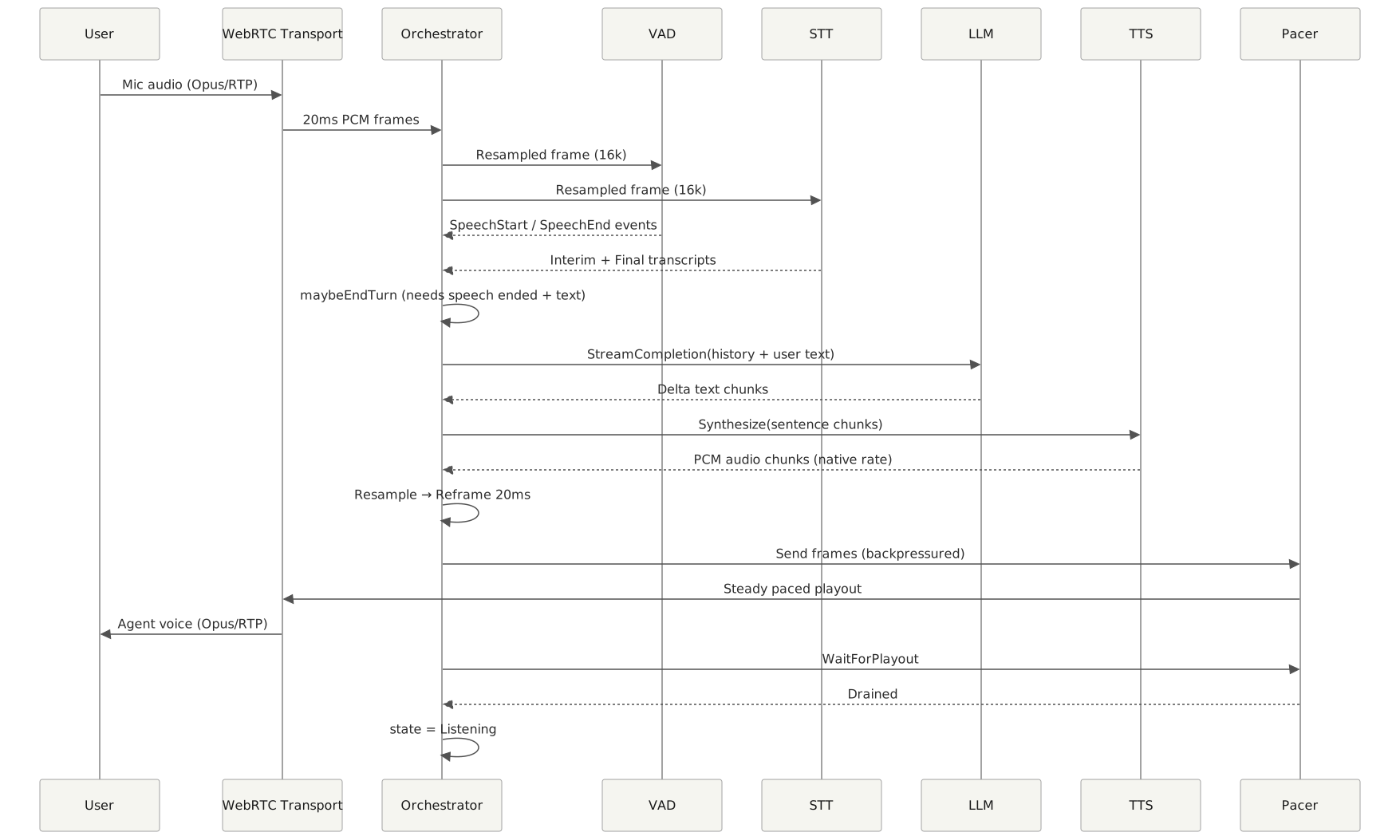
Audio starts in the browser. The user's microphone captures their voice, the browser encodes it as Opus and sends it over WebRTC as RTP packets. The server receives those packets as an audio track. So far, normal WebRTC.
But the server cannot use Opus directly. The models downstream expect raw PCM. So the first thing the transport layer does is decode the incoming packets into PCM frames. More on this later.
Once those PCM frames are ready, they enter what I call the orchestrator. The orchestrator is not a straight pipeline. It is closer to a small state machine with two states.
In the Listening state, two things happen at the same time. The audio frames go to STT, which converts speech into text. The same frames also go to VAD, which is constantly asking one question. Is the user still speaking, or have they stopped?
STT keeps producing transcript text as the user talks. But the agent does not respond yet. It waits. It needs two signals before it treats the accumulated text as a complete turn. VAD has to say the user stopped speaking, and STT has to have produced final text. Only when both conditions are true does the orchestrator move on.
Then the agent enters the Responding state. It sends the full user turn to the LLM. The LLM does not need to finish its entire response before audio starts playing. It streams tokens back gradually. As soon as the orchestrator accumulates a complete sentence, it sends that sentence to TTS.
TTS turns each sentence into audio. But that audio is not ready to send yet. It has to be resampled to the right rate, sliced into 20 ms frames, paced so it does not arrive in bursts, and encoded back into Opus before it goes out over WebRTC. Each of those steps has its own problems. I will get into all of them below.
But even while the agent is responding, it cannot become deaf. The incoming microphone audio is still being monitored. If VAD or STT detects that the user started speaking over the agent, the orchestrator cancels the current response, clears any queued audio, and switches back to Listening. This is barge-in. Without it, the agent feels like a recording you cannot interrupt.
So the system is not simply user audio going through STT, then the LLM, then TTS, then back to the speaker. It is a turn-based state machine. Listening means understanding when the user is speaking and collecting their words. Responding means generating and playing the reply while still watching for interruption. The whole time, the clock is running.
One thing you notice pretty quickly when building these systems is that audio lives in two formats, and they show up everywhere. Opus on the wire, PCM on the inside.
Opus is compressed. It is what WebRTC uses because sending raw audio over the network would be wasteful. It is small, it handles packet loss well, and it is designed for exactly this kind of real-time transport.
PCM is the opposite. It is uncompressed. Just raw numbers, one per sample. That is what makes it useful inside the server. You can resample it, measure its energy, slice it into frames, run it through VAD, feed it to STT. You cannot do any of that easily with compressed audio. You need the raw samples.
So the pattern in every system like this is the same. Opus comes in from the browser and gets decoded into PCM so the pipeline can work with it. When the agent has something to say, TTS produces PCM, the server processes it, and the last step is encoding it back into Opus to send over WebRTC. The whole pipeline lives between those two conversions.
That is the shape of the thing. Now let's look at each piece up close.
Signaling
Before any audio flows, the browser and the server have to agree on how to talk to each other. This is signaling.
WebRTC does not just open a socket and start sending audio. Both sides first need to exchange a description of what they want to send, what they can receive, which codecs they support, and how to reach each other on the network. This exchange happens through something called SDP.
SDP stands for Session Description Protocol. It is not audio. It is a text document that describes the shape of the media session before it starts. The browser creates an SDP offer and sends it to the server. The server looks at the offer, decides what it can support, and sends back an SDP answer. Once both sides have applied their half, WebRTC knows enough to start the connection.
What does an SDP actually contain? Roughly the following.
- Media sections that say what kind of media is being exchanged. Audio, video, or a data channel.
- Codec information like Opus for audio or VP8 for video. Both sides need to agree on a codec before anything can be encoded or decoded.
- RTP payload mappings that assign a number to each codec. For example, payload type 111 means Opus at 48 kHz. When an RTP packet arrives with payload type 111, the receiver knows how to decode it.
- Media direction that says whether each side wants to send, receive, both, or neither. Values like
sendrecv,sendonly,recvonly, orinactive. - ICE credentials for connectivity checks. A username fragment and password that both sides use to verify they are talking to the right peer.
- ICE candidates that describe possible network paths. These can be included directly in the SDP or exchanged separately using trickle ICE.
- DTLS fingerprint used to verify the encrypted connection. WebRTC encrypts all media with DTLS-SRTP, and the fingerprint in the SDP lets each side confirm the other's identity.
- RTP and RTCP options like
rtcp-mux, header extensions, and feedback mechanisms. These control how the media transport behaves at the packet level.
None of this is audio. All of it has to happen before audio can start. The SDP exchange is what turns two strangers on the internet into a WebRTC session that can carry real-time media.
If you want to go deeper into how WebRTC signaling works, WebRTC for the Curious covers it well.
The Media Pipeline
This is where the interesting part starts. Signaling sets up the connection, but everything that follows is about what happens to the audio once it starts flowing.
Incoming Audio From the Browser
When the user speaks, their microphone captures audio and the browser sends it to the server over WebRTC. The standard clock rate for WebRTC audio is 48 kHz. That means the audio timeline is measured as if there are 48,000 samples per second.
The server does not process one sample at a time. It groups samples into blocks and processes them together. The standard block size in real-time audio is 20 ms. At 48 kHz, that works out to
48,000 samples/second × 0.02 seconds = 960 samples
So one 20 ms audio frame at 48 kHz contains 960 samples for mono audio. That 960-sample frame is the basic unit that moves through the system.
These frames arrive as Opus, which is great for transport but not useful for processing. The server decodes each Opus frame into PCM, giving it 960 raw samples it can actually work with. STT, VAD, volume checks, resampling, buffering, and frame manipulation all need raw samples. That is what PCM gives you.
Once the server has a 20 ms PCM frame, it is ready to send it downstream. The frame goes to both STT and VAD at the same time. They run concurrently, but they answer different questions. STT is converting speech into text. VAD is deciding whether the user is speaking or not.
But before either of them can use the audio, one more thing has to happen.
Resampling
At this point we have 48 kHz PCM frames, 960 samples each. But most speech models and VAD models do not want 48 kHz. They want 16 kHz.
This is not arbitrary. Human speech does not need the full frequency range that 48 kHz provides. 48 kHz captures frequencies up to 24 kHz, which is great for music, but speech recognition and voice activity detection are trained on 16 kHz audio, which captures up to 8 kHz. That covers the full range of human speech with nothing wasted.
So before sending audio to STT or VAD, the server resamples each frame from 48 kHz down to 16 kHz. The same 20 ms of audio becomes a smaller frame.
16,000 samples/second × 0.02 seconds = 320 samples
The 960-sample frame becomes a 320-sample frame. Same duration of audio, fewer samples, lower frequency resolution. This is the frame that travels through STT and VAD.
How STT Works
STT stands for Speech to Text. Its job is to take audio samples and turn them into written text.
The server streams the resampled 16 kHz PCM frames into the STT engine continuously. It does not wait for the user to finish speaking. Every frame goes to STT as soon as it is ready.
The STT provider returns transcript results over time, and there are two kinds.
An interim transcript is temporary. It is what the model currently thinks the user is saying, but it may change as more audio arrives. While the user says "Can you book a meeting tomorrow morning?" the STT might stream interim results like
- Can you
- Can you book
- Can you book a meeting
- Can you book a meeting tomorrow
A final transcript is stable. It means the model believes this segment of speech is complete and will not change. Eventually the STT emits a final result. "Can you book a meeting tomorrow morning?"
The orchestrator accumulates final transcript text into the current user turn.
Why STT Alone Is Not Enough
A common mistake is to think that when STT gives you text, you should send it to the LLM. But that is too early.
The user may still be speaking. STT can produce final text for a phrase before the user has finished their sentence. If you send every final transcript to the LLM immediately, the agent will interrupt the user mid-thought and respond to incomplete input.
That is why the system does not act on STT alone. It waits for a second signal from VAD saying the user has actually stopped speaking. Only when both are true does the orchestrator treat the accumulated text as a complete turn.
How VAD Works
VAD stands for Voice Activity Detection. It receives the same resampled 16 kHz audio that STT gets, but it answers a different question. Is the user speaking right now, or have they stopped?
I use Silero for VAD. Silero is a small neural network that takes a window of audio samples and returns a probability between 0 and 1. Something like 0.12 means silence. Something like 0.82 means speech.
Silero needs 512 samples per inference. But each resampled frame only gives us 320 samples. So we cannot run the model on every frame. Instead, we buffer.
The buffering logic is simple. We keep accumulating samples until we have at least 512, then we run inference.
- Frame 1 gives 320 samples. Not enough. Wait.
- Frame 2 brings the total to 640. Take 512, run inference. Keep the leftover 128.
- Frame 3 adds 320 to the leftover 128, giving 448. Not enough. Wait.
- Frame 4 adds 320 more, giving 768. Take 512, run inference. Keep 256.
There is one more detail. After the very first inference, we do not just send a raw 512-sample window to the model. We save the last 64 samples from the previous window and prepend them to the next one. So the model actually receives 576 samples, 64 from the previous window plus 512 new ones.
Why? Because speech does not stop cleanly at window boundaries. A syllable might start at the end of one window and continue into the next. The 64-sample overlap gives the model continuity so it does not miss speech that falls on the edge.
When we run inference, the model returns a probability. Now we need to turn that probability into a decision. We use two thresholds instead of one.
- Speech threshold, 0.5. If the probability is at or above 0.5 and the system is not already in a speaking state, it emits SpeechStart.
- Silence threshold, 0.35. If the probability drops below 0.35 and the user was speaking, a silence timer starts. If the silence lasts for at least 100 ms (1,600 samples at 16 kHz), the system emits SpeechEnd.
If the probability goes back above 0.5 before the 100 ms timer runs out, the timer is cancelled. The user was just pausing between words.
Why two thresholds instead of one? If you use a single threshold like 0.5, the probability might bounce between 0.48 and 0.52 rapidly. The system would flicker between speaking and not speaking. Two thresholds with a gap between them prevent that. The probability has to cross 0.5 to start and drop below 0.35 to stop. The gap absorbs the noise.
Why wait 100 ms before emitting SpeechEnd? Because humans pause between words. A brief dip in probability does not mean the user is done talking. The timer makes sure the silence is real.
What Happens When SpeechStart Is Published
When the orchestrator receives SpeechStart, it marks userSpeaking = true and records the timestamp for latency tracking.
But there is a more important case. If the agent is currently in the Responding state, meaning it is playing audio back to the user, SpeechStart triggers barge-in. The orchestrator cancels the LLM stream, stops TTS, clears all queued playback audio, and switches back to Listening.
SpeechStart during a response means the user is talking over us. Stop immediately.
What Happens When SpeechEnd Is Published
When the orchestrator receives SpeechEnd, it does not immediately trigger the LLM. It checks whether there is final transcript text from STT.
If yes, the user turn is complete. The orchestrator sends the accumulated text to the LLM and transitions to Responding.
If no text has arrived yet, it waits. STT might still be processing the last few frames. When the final transcript eventually arrives, that is what triggers the turn.
So SpeechEnd alone does not start the response. Neither does final text alone. Whichever arrives last is the one that triggers the turn. The system needs both before it moves on.
The Response Path
Once the turn is complete, the orchestrator sends the accumulated text to the LLM.
LLM Streaming
The LLM streams tokens back one at a time. If you wait for the full response before doing anything, the user sits in silence for two or three seconds. So we do not wait. We start sending audio as soon as we have enough text to speak.
Sentence Chunking
We buffer the streaming tokens and watch for sentence boundaries. As soon as we have a complete sentence, we send it to TTS. The LLM keeps streaming the next sentence while TTS synthesizes the first one. That overlap is where the latency savings come from.
Sentence detection is harder than splitting on periods. "$9.99" has a decimal. "Dr. Smith" has an abbreviation. "example.com" has a domain. The chunker skips periods in these cases. It does not need to be perfect. Getting it 95% right is fine. If the buffer grows past about 160 characters without a sentence boundary, we force a split at the last word boundary.
The Timing
The user finishes speaking. Around 300 ms later the LLM starts streaming. By 600 ms the first sentence is ready and goes to TTS. By about one second the user hears the first word. Meanwhile the LLM is still generating sentence two. The user hears a continuous reply with about one second of initial delay, even though the full response might take three or four seconds.
Cancellation
All of this is cancellable. If the user barges in, the orchestrator cancels the LLM stream, stops TTS, clears the pacer buffer, and switches back to Listening. This happens through context cancellation. Every goroutine checks the context and stops.
TTS, Resampling, and the Pacer
This is the most important part of the outbound audio path. This is where text becomes sound the user actually hears. Every detail here affects whether the voice sounds smooth or stuttery.
Here is the full outbound path from LLM text to the user's speaker. Each box is a stage I had to build, and each arrow is where the format or timing changes.


TTS Streaming
Each complete sentence from the LLM goes to the TTS provider. TTS does not return one big block of audio. It streams audio back in chunks. Each chunk contains raw PCM samples at the TTS provider's native sample rate. Different providers use different rates. Rime outputs at around 22 kHz. OpenAI outputs at 24 kHz. Neither is 48 kHz, which is what WebRTC needs.
The chunks are uneven. TTS does not care about 20 ms boundaries. It sends audio as it generates it, in whatever size it feels like. Sometimes a chunk arrives quickly. Sometimes there is a 100 ms gap before the next one.
This is the fundamental problem of the outbound path. TTS gives us bursty, unevenly-sized audio at the wrong sample rate. WebRTC needs steady, exactly 960 sample frames at 48 kHz, one every 20 ms. Three things need to happen to bridge that gap. Resample, reframe, and pace.
Streaming Resampler
The TTS audio needs to be converted from whatever rate the provider uses (say 22 kHz) to 48 kHz. 22 kHz means 22,000 samples per second. 48 kHz means 48,000 samples per second. We need to produce more output samples than we received, because the output rate is higher.
How Resampling Works
Audio samples are measurements of a sound wave taken at regular intervals. At 22 kHz, there are 22,000 measurements per second. At 48 kHz, there are 48,000. Resampling means figuring out what the wave looks like at the new, more frequent measurement points.
The new measurement points do not line up with the old ones. If the old samples are at positions 0, 1, 2, 3, the new samples might need values at positions 0, 0.458, 0.917, 1.375, and so on. Position 0.458 does not correspond to any original sample. It falls between the original sample at position 0 and the original sample at position 1. So we need a way to estimate what the audio value would be at a position between two known samples. That is interpolation.
Where the Formula Comes From
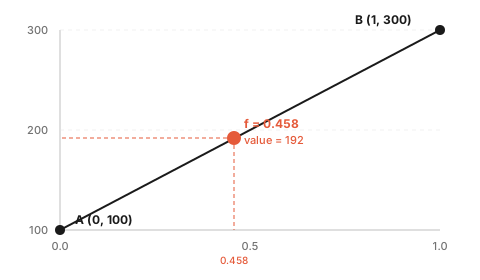
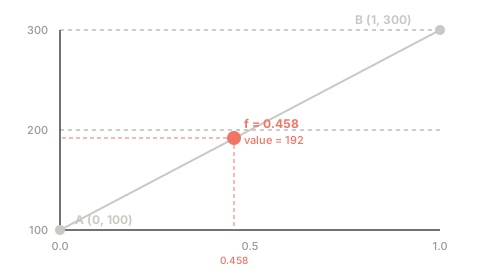
Imagine you have two data points. Point A is at position 0 with value 100. Point B is at position 1 with value 300. You want to know the value at position 0.458, somewhere between them.
The simplest approach is to draw a straight line between the two points and read the value on that line at position 0.458. This is linear interpolation. How far are you from A toward B? 0.458 out of 1.0. So you are 45.8% of the way. Call that fraction f.
The value at that position is a weighted average. Take A's value weighted by how close you are to A, plus B's value weighted by how close you are to B.
value = A × (1 - f) + B × f = 100 × 0.542 + 300 × 0.458 = 54.2 + 137.4 = 192
If f = 0.0, you are exactly at A. The formula gives 100. If f = 1.0, you are exactly at B. It gives 300. If f = 0.5, you are in the middle. It gives 200. Anything in between gives a proportional blend. That is all linear interpolation is.
The Step Size
We need to know where each output sample falls in the input. The step size tells us how far we advance in the input for every output sample we produce.
step = input rate / output rate = 22000 / 48000 = 0.458
Why this formula? In one second, we have 22,000 input samples and we need to produce 48,000 output samples. So each output sample covers 22000/48000 = 0.458 input samples worth of time. Each time we produce an output, we move 0.458 positions forward in the input. Starting at position 0.0, the positions go 0.000, 0.458, 0.917, 1.375, 1.833, 2.292, and so on.
A step less than 1.0 means we move less than one input sample per output sample. We produce more outputs than inputs. We are upsampling. That makes sense because 48 kHz has more samples per second than 22 kHz.
What Chunk-by-Chunk Resampling Is
TTS does not give us all the audio at once. It streams audio in pieces. Maybe 200 samples arrive, then a pause, then 500 more, then 300 more. Each piece is a chunk. Chunk-by-chunk resampling means every time a new chunk arrives, we resample just that chunk by itself. Start fresh at position 0.0, feed in the chunk, collect the output, throw away the state. Next chunk, start fresh again.
For a single isolated buffer this works fine. But for a continuous stream where chunks are pieces of the same audio, it is wrong.
Why Chunk-by-Chunk Resampling Breaks
Two problems. Boundary artifacts and position drift.
Boundary artifacts. Say chunk one ends with samples [..., 480, 500] and chunk two starts with [510, 520, ...]. In the real audio, 500 and 510 are neighbors. If an output sample falls between them, a streaming resampler interpolates using both. Resampling each chunk independently resets the fractional position and loses that connection. The output timing can shift at the join.
A chunk boundary does not automatically cause a click. For example, if chunk one ends at -3000 and chunk two begins [-2800, 5000, ...], the boundary is -3000 to -2800. The jump to 5000 occurs inside chunk two. A click can occur if resetting the resampler makes the output jump abruptly compared with the wave that should have continued across the boundary. Whether you hear one depends on the waveform and where the split falls.
Position drift. Each chunk resets position to 0.0. But the correct next position is usually not 0.0. It is wherever the resampler was when it ran out of input. Maybe 0.21 or 0.73. This seems like a tiny error. But it happens at every chunk boundary. Over a three-second utterance at 48 kHz, that is 144,000 output samples. Each one is spaced slightly wrong. The accumulated error shows up as pitch drift. The voice gradually sounds a little too fast or a little too slow. Not dramatically, but enough that it sounds subtly off.
The Solution
A streaming resampler fixes both problems. Between calls, it keeps the leftover input samples it could not use last time (because it needed the next sample for interpolation and it was not available yet) and the exact fractional position where it stopped.
When the next chunk arrives, it appends the new samples to the leftovers and continues from where it stopped. From the resampler's perspective, there are no chunks. It is processing one long continuous stream that happens to arrive in pieces.
The leftovers fix the boundary problem. The last sample of chunk one and the first sample of chunk two sit next to each other in the buffer, so interpolation works across the boundary. The carried position fixes the drift problem. Output samples are spaced with perfect consistency, as if the entire stream had been resampled in one pass.
At the end of an utterance, a flush method outputs whatever remains in the buffer so nothing is lost. The resampler resets and is ready for the next sentence.
Reframing
After resampling, we have 48 kHz PCM samples. But they are not in neat 20 ms frames. They are in whatever-sized chunks the resampler happened to output, which depends on whatever-sized chunks TTS sent in.
WebRTC needs exactly 960 samples per frame. So we need to collect samples until we have 960, emit a frame, collect more, emit another frame. This is what the SampleBuffer does. It has an internal pending buffer. When you push samples in, it appends them to pending. Then it checks whether pending has 960 or more. If yes, it takes 960 and emits a frame. It keeps going until pending has fewer than 960, and holds the leftover for the next push.
At the end of an utterance, there might be fewer than 960 samples left. Maybe 400 samples. You cannot throw them away because that is the tail end of the sentence. But you cannot send a 400-sample frame because WebRTC expects exactly 960. So the buffer has a flush method that pads the remaining samples with silence to fill a full frame. The user hears the last bit of audio followed by a tiny bit of silence, which is inaudible.
Fade In and Fade Out
Audio samples are numbers. They represent where the sound wave is at each point in time. In 16-bit PCM, they range from -32768 to +32767. Zero means the wave is at rest. Positive and negative values are the wave swinging above and below the center line. A spoken word produces samples that cross zero many times per second. That is normal speech.
The Problem
TTS produces each sentence independently. It synthesizes sentence one, then sentence two, as completely separate audio. The last few samples of sentence one might be something like 1200, 800, 350. The first few samples of sentence two might be -2100, -1800, -900. When you play them back to back, the audio goes from 350 to -2100 in a single sample. That is a jump of 2450. The wave did not have time to cross through zero smoothly. That discontinuity is a click. The speaker cone physically jerks from one position to another, and your ear hears a tiny pop.
If both sentences happened to end and start near zero, there would be no click. But you cannot control that. TTS does not know where the next sentence's waveform will begin.
The Fix
At the end of sentence one, gradually bring the sample values down to zero. At the start of sentence two, gradually bring them up from zero. Then the boundary is always near-zero to near-zero. No jump. No click.
We do this by multiplying each sample by a gain value between 0.0 and 1.0. Multiplying by 1.0 means no change. Multiplying by 0.0 means silence. Multiplying by 0.5 means half volume. A sample of 4000 becomes 2000.
How Many Samples Get Faded
The fade duration is 5 ms. At 48 kHz, that is 240 samples. One frame is 960 samples (20 ms). So the fade affects 240 out of 960 samples. The remaining 720 pass through unchanged. Only two frames per sentence are affected. The first frame gets fade-in on its first 240 samples. The last frame gets fade-out on its last 240 samples. Every frame in between passes through at full volume.
Fade-In
Each of the 240 samples gets a gain that ramps linearly from 0.0 to 1.0. The gain for each sample is its index divided by 239. Sample 0 has gain 0/239 = 0.000. Sample 120 has gain 120/239 = 0.502. Sample 239 has gain 239/239 = 1.000. From sample 240 onwards, no fade is applied.
Here is what that looks like with real numbers. Say the original samples at the start of sentence two are -2100, -1950, -1800, -1500, and so on.
Index:      0       1       2       3     ...   120    ...   239     240
Gain:    0.000   0.004   0.008   0.013   ...  0.502   ...  1.000   (none)
Original: -2100  -1950   -1800   -1500   ...   3000   ...   1400     800
Result:      0      -8     -15     -19   ...   1506   ...   1400     800
The first sample becomes zero. The next few are nearly silent. By sample 120, the audio is at half volume. By sample 239, it is at full volume. The whole ramp takes 5 ms. Too fast to hear as a volume change. But the waveform now starts from zero instead of jumping in at -2100.
Fade-Out
Same idea, reversed. The fade is applied to the last 240 samples of the frame. Samples 0 through 719 play at full volume. Starting at sample 720, the gain ramps from 1.0 down to 0.0. The gain for each fade sample is (959 - index) / 239.
Index:    718     719     720     721     722   ...   840    ...   958     959
Gain:   (none) (none)  1.000   0.996   0.992  ...  0.498   ...  0.004   0.000
Original: 2200   1800    1200    1100     950  ...   -600   ...    350     200
Result:   2200   1800    1200    1096     943  ...   -299   ...      1       0
The audio plays at full volume until sample 720. Then the gain starts dropping. By sample 840, it is at half. By sample 959, it is zero. The waveform smoothly reaches silence. Then the next sentence starts with its own fade-in from zero. The boundary is always near-zero to near-zero. No click.
Why 5 ms
5 ms is long enough for the wave to reach zero without an abrupt cut. But it is far too short for a human to hear as a volume change. You do not perceive a 5 ms ramp. You just stop hearing clicks. If the fade were too long, like 100 ms, you would hear the end of each sentence getting quieter and the start getting louder. That sounds unnatural. 5 ms is the sweet spot.
How The System Knows First And Last
The system cannot know which frame is the last until the sentence is over. So it holds one frame back at all times. When the first frame of a sentence arrives, it applies fade-in and holds it. When the next frame arrives, the held frame is clearly not the last one, so it gets sent to the pacer without fade-out. The new frame becomes the held frame. When the sentence ends and no more frames are coming, the held frame is the last one. It gets fade-out applied and gets sent. This way fade-in always lands on the first frame, fade-out always lands on the last, and everything in between passes through untouched.
The Pacer
Now we have clean, resampled, reframed, fade-smoothed 20 ms PCM frames at 48 kHz. They need to get to WebRTC. But we cannot dump them as fast as they arrive. TTS is bursty. Sometimes five frames arrive at once. Then nothing for 150 ms. Then three more. If we sent frames as they arrived, the user would hear audio, then a gap, then audio, then a gap. That is stuttering.
The pacer sits between the TTS output path and the WebRTC encoder. Its job is to convert bursty input into steady output.
The 20 ms clock. The pacer runs a ticker that fires every 20 ms. Every tick, it emits exactly one frame. If it has audio, it emits audio. If it does not, it emits a silent frame of 960 zeros. Either way, it always emits. WebRTC expects one frame every 20 ms, no exceptions.
The jitter buffer. The pacer has an internal sample buffer. When frames arrive from the TTS path, they are appended to this buffer. When the 20 ms tick fires, it takes 960 samples from the buffer and emits them. This absorbs the burstiness. TTS can dump five frames at once and the pacer plays them out steadily, one per tick.
The prebuffer cushion. The pacer does not start playing the instant the first frame arrives. If it did, TTS might not have sent the next frame yet by the time the next tick fires. The pacer would emit silence. The user would hear one frame of audio, then a gap, then audio again. Instead, the pacer waits until it has accumulated 10 frames (200 ms) before it starts playing. This cushion means that even if TTS is a little slow or bursty, the buffer has enough audio to keep playing smoothly while new audio catches up. 200 ms of initial delay is barely noticeable but it eliminates stuttering.
Start timeout. If the utterance is very short, like the agent just says "OK," it might only produce three or four frames. That is less than the 10-frame threshold. The pacer would wait forever for a cushion that will never fill. So there is a timeout. If the pacer has been holding audio for 160 ms without reaching the threshold, it starts playing anyway.
Underrun and re-buffering. Even with the cushion, the buffer can run dry. Maybe TTS is slower than real-time for a moment. The pacer plays through its cushion and hits zero samples. When this happens, it emits a silent frame and goes back into buffering mode. It waits for the buffer to rebuild the cushion before resuming. One longer pause is less annoying than many one-frame stutters.
Backpressure. What if TTS is faster than real-time? A fast provider might produce audio at twice playback speed. Without a limit, the buffer would grow forever. Memory goes up, latency goes up. So the buffer has a ceiling of 50 frames, which is one second of audio. When the buffer is full, the upstream send call blocks. TTS is naturally throttled to real-time because it cannot push audio faster than the pacer consumes it. No audio is dropped. The producer just slows down.
Clear (barge-in). When the user interrupts, the pacer stops immediately. The clear method empties the entire buffer and drains any frames sitting in the inbound channel. The user interrupted. Everything queued is now irrelevant.
WaitForDrain. At the other end of the lifecycle, the LLM is done, TTS is done, all frames have been queued. But the pacer might still have 400 ms of audio in its buffer that has not been played yet. WaitForDrain blocks the caller until the buffer is empty. Every tick, the pacer plays one frame. Eventually the buffer empties and it signals the waiter. This is how the orchestrator knows the user has actually heard the entire reply before switching back to Listening.
Opus Encode and Send
After the pacer emits a frame, it goes to the outbound encoder. The encoder takes 960 PCM samples at 48 kHz, compresses them into an Opus packet, and writes that packet to the WebRTC audio track with a duration of 20 ms. The WebRTC stack handles RTP packetization, sequencing, timestamping, and sending it over the network. The browser receives the Opus packet, decodes it, and plays it through the speaker.
The Full Chain
TTS streams audio at its native rate in uneven chunks. The streaming resampler converts to 48 kHz, carrying state across chunks so there are no boundary clicks. The SampleBuffer collects resampled audio and emits exactly 960 sample frames. Fade-in on the first frame and fade-out on the last frame prevent pops at sentence boundaries. Frames go into the pacer's inbound channel. The pacer prebuffers 200 ms, then emits one frame every 20 ms on a steady clock. The Opus encoder compresses each frame. WebRTC sends it to the browser. The user hears smooth, continuous speech.
Conclusion
This is what voice agent orchestration looks like behind the scenes. The code varies across implementations, but the concepts are the same. This is what is happening inside LiveKit and Pipecat. If you have read this far, you understand the media pipeline well enough to build one yourself.
One thing I am happy about is how it is structured. The agent orchestration layer and the transport layer are completely separate. The transport knows how to move audio. The orchestrator knows how to think. They do not depend on each other. I can swap out the browser transport, connect it to a custom SIP gateway, and build phone agents instead. The only thing that changes is how audio gets resampled at the boundary. Everything else stays the same.
The next post is about how this behaves at scale. The issues I found, the behaviors I did not expect, and how I fixed them.